
iOS App · AI Color Analysis · Shopping Guard
ColorCheck — your AI shopping guard for clothes in the wrong color
Store lighting makes it hard to tell whether a color suits you, and the wrong shade often ends up unworn. ColorCheck scans any clothing item in 3 seconds and tells you BUY (87% match) or SKIP (23% match) based on your specific 12-season color palette. Plus a savings counter, closet audit, and a 14-page PDF color report.

Overview
What is ColorCheck?
ColorCheck is an iPhone AI shopping guard that determines your precise 12-season color profile and then gives you a live BUY or SKIP verdict on any clothing item — in 3 seconds, in any store.
The problem it solves: clothes bought in the wrong color often go unworn. The dominant cause is not style — it is color. Wrong-undertone clothing makes your skin look sallow or ruddy. Wrong-depth clothing washes you out. Wrong-contrast clothing overwhelms your features. You typically cannot tell which is happening under store lighting (warm halogen, fluorescent, LED — all biased). ColorCheck is the 3-second diagnostic that closes that gap before you commit money.
The App Store has 18+ color analysis apps. Most give you a palette and stop there. ColorCheck is the only app that takes you from palette to per-garment verdict — the "I have a palette, now what?" problem that plagues the entire category.
Audience
Who ColorCheck is built for
The overwhelmed shopper
You're 28–38, work full-time, shop 2–3 times a month with $80–150 per trip. Your closet is full but you have "nothing to wear." The savings counter on the home screen shows what you skipped, in dollars.
The TikTok color convert
You're 18–28, Gen Z. You saw #coloranalysis on TikTok (3–5 billion views). You watched someone explain why everything in their closet finally makes sense as a Warm Autumn or a Cool Summer. You downloaded three different color analysis apps and got three different season results. ColorCheck's multi-photo averaging plus confidence scoring fixes the "every app gives me a different season" problem that destroyed your trust in the category.
The capsule wardrobe builder
You're 28–45, minimalist, read r/capsulewardrobe, watch "10 items 30 outfits" videos. You shop once or twice a month but spend $100–250 per purchase. You may already know your color season. What ColorCheck adds is the in-store decision layer — knowing your season is one thing, but in artificial lighting holding a specific olive blouse, you still aren't sure. The scanner closes that gap.
The online shopper
You return 24–40% of what you order from ASOS, Zara, or H&M online — often because "the color in the photo wasn't the real color." Different retailers warm or cool their product photos differently — Anthropologie photos are noticeably warm/sepia, ASOS leans neutral, Zara varies wildly. ColorCheck's screenshot analysis corrects for known store filter biases and gives you a verdict on what color the item probably actually is, not what the photo looks like.
Capabilities
The seven features that matter most
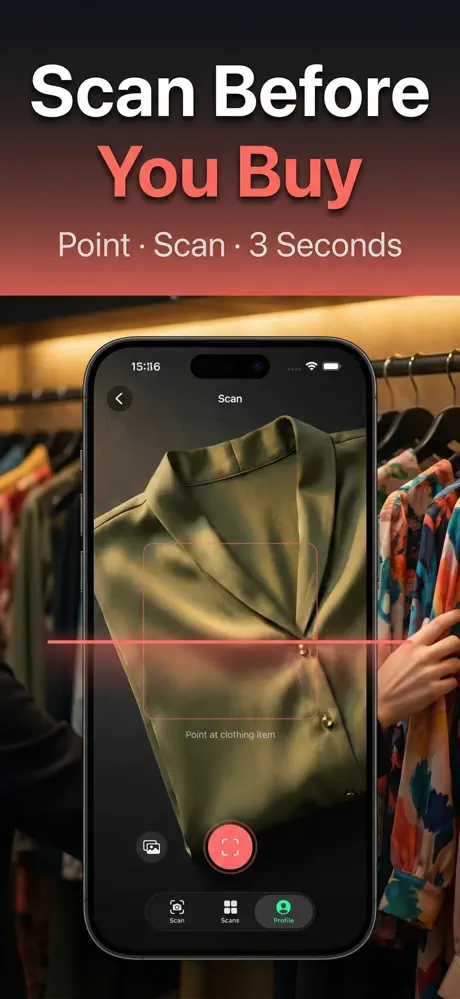
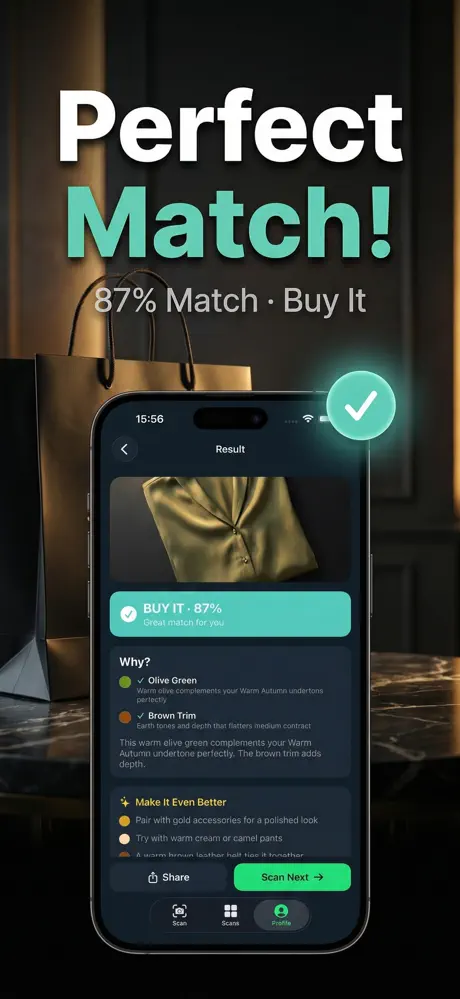
- In-store BUY or SKIP verdict — the core job. Point your camera at any clothing item. Three seconds. "BUY IT — Olive Green, 87% match" or "SKIP IT — Mint Green, 23% match" with a one-sentence explanation and a suggested alternative ("Try a warm olive instead — same vibe, your colors"). This single feature is what makes ColorCheck different from the rest of the category.
- 12-season color analysis with confidence score. 3-photo analysis (selfie + close-up of eyes + wrist) processed with multi-photo averaging. Result: your precise season from the professional 12-season system (Light Spring, True Spring, Bright Spring, Soft Summer, True Autumn, Deep Winter, etc.) with a confidence score. If confidence is below 70%, the app explicitly recommends re-analysis with better lighting rather than committing you to an uncertain season.
- Savings counter. Every SKIP scan in a store adds the price-tag value to your monthly savings counter. Home screen shows running totals: "Saved $341 this month." Wellness-tracking apps show streaks — ColorCheck shows dollars.
- Closet audit. After your season is determined, scan your existing closet. Each item gets a KEEP or DONATE verdict with reasoning. End of scan: "62% KEEP, 38% DONATE — $280 of wrong-color clothes." Most users scan 10–30 items the first day, so you see results on the first day.
- AI stylist chat for follow-up questions. "Does this neckline work for my shape?" "Can I wear gold jewelry with this?" "Is this shade too cool for my Warm Autumn palette?" The AI stylist is trained on the same color and styling knowledge base. Use it after a scan when you have questions the binary verdict didn't answer.
- Celebrity color twins. "You're a Warm Autumn like Jessica Alba." "You're a Cool Winter like Anne Hathaway." Concrete celebrity references make the abstract season label aspirational and tangible. Solves the "I don't like my season" problem — being a Warm Autumn feels different when Jessica Alba is the example than when you're staring at a beige-and-brown palette.
- 14-page PDF color report. A detailed PDF report you can keep. Includes your season analysis with reasoning, full 30+ color palette with hex codes, best neutrals (your specific white, black, beige, navy, denim), metals guide (gold/silver/rose gold), celebrity matches, and a styling primer. Export and share with friends, save for reference, keep for reference.
Workflow
How a ColorCheck session works — four steps
- Take 3 photos for your color season.Selfie in natural daylight (window light, no filter, no makeup if possible). Close-up of your eyes. Close-up of your wrist (showing veins for undertone). Total time: under 2 minutes.
- Get your 12-season result with confidence score.Result in 10–15 seconds: "You are a Warm Autumn (87% confidence). Your undertone is warm, your contrast is medium, your depth is medium-deep." Plus your 30+ color palette, celebrity matches, and best neutrals. If confidence is below 70%, the app recommends a re-analysis with better lighting — free and unlimited during Pro.
- Scan clothing items before you buy them.In-store: hold the garment up, point camera, 3 seconds, verdict. 80%+ match = BUY IT. 40–79% = borderline, your call. Under 40% = SKIP IT with a suggested alternative in your palette. The scanner is calibrated to correct for common store lighting biases. You can also screenshot online product pages — ColorCheck corrects for known retailer filter patterns.
- Track your savings monthly.Every SKIP adds the avoided price to your counter. Optional: scan your existing closet for the audit feature — KEEP or DONATE verdict on each item, resale value estimate, positive framing. Most users see "Saved $80–150 this week" within the first weekend of active use.
Comparison
ColorCheck vs Style DNA vs Palette — honest side-by-side
Style DNA launched in 2018 and is the category leader by review count (7,099 ratings). ColorCheck launched April 2026 with a fundamentally different focus: the BUY/SKIP scanner for individual items, multi-photo averaging for stable seasons, and a savings counter that quantifies money saved. Here is the honest comparison. Full disclosure: ColorCheck is our app.
| ColorCheck | Style DNA | Palette | |
|---|---|---|---|
| In-store BUY or SKIP verdict | Yes — 3 seconds | Browsing only, not in-store scanner | No |
| 12-season color analysis | Yes — with confidence score | Yes | Yes |
| Multi-photo averaging | Yes — 3 photos (selfie + eyes + wrist) | Single selfie | Single selfie |
| Confidence score on results | Yes (e.g. 87%) | Binary verdict | Binary verdict |
| Savings counter (dollars saved) | Yes | No | No |
| Closet audit feature | Yes | Limited | No |
| Celebrity color twins | Yes | Yes | Basic |
| 14-page PDF color report | Yes | Limited | No |
| AI stylist chat | Yes | Limited | No |
| Outfit recommendations | Basic | Extensive — styling content | Basic |
| Honest 7-day free trial (no quiz) | Yes — clear close button | Quiz then paywall | No |
| Annual price | $39.99 | ~$69–99 | ~$415 (weekly only) |
| App Store rating | 4.9★ (11 ratings) | ~4.5★ (7,099 ratings) | — |
The fundamental difference: Style DNA determines your color season and returns a palette plus styling content — the output is the palette. ColorCheck uses the same color season determination as the entry point but is built around the in-store BUY/SKIP scanner for individual clothing items. Choose ColorCheck if you want decision support on specific items when you're in Zara or scanning thrift store finds. Choose Style DNA if you want extensive outfit recommendations and lookbooks. Both apps offer free access — try each before subscribing.
In practice
Situations where ColorCheck helps
Illustrative examples of how the features fit into a day, not user reviews.
The $79 olive blouse in Zara
You're standing in Zara holding a $79 olive green blouse. The shade looks nice on the hanger. You're not sure if it'll wash you out in real light. Asking a friend is slow. Googling "what colors suit me" returns abstract palette wheels. Even the Color Me Beautiful swatch fan you bought for $40 can't tell you whether this specific shade of olive matches the warm olive on the fan. ColorCheck scan: "Olive Green, 87% match. BUY IT." Three seconds. You buy it with confidence — and wear it every week.
The Anthropologie mustard sweater
You're at Anthropologie holding a $128 mustard-yellow sweater. The shade looks rich and warm under the store's halogen lighting. Without ColorCheck, you'd hesitate, buy it on instinct. ColorCheck scan: "Mustard Yellow — 31% match. SKIP. Try Camel or Terracotta instead — same warmth, your season." You put it back. One prevented $128 purchase covers your ColorCheck annual subscription three times over.
The 20-minute closet audit
A 32-year-old Warm Autumn user audits 60 items in her closet. Result: 36 KEEP, 24 Donate-or-Resell. Original purchase value of the donate pile: $1,840. Expected Poshmark resale: $370–550. Most painful finding: $280 of items still had tags. After the audit she eliminated cool pinks, powder blues, lavenders, pure whites, and pure blacks from future purchases. Months later: a growing savings counter, closet feels coordinated, "nothing to wear" feeling essentially disappeared.
The online return cycle breaker
You return 24–40% of what you order from ASOS — often because "the color in the photo wasn't the real color." You screenshot the product page and run it through ColorCheck. The scanner corrects for ASOS's known neutral-bias filter and gives you a verdict on what color the item probably actually is. You send back fewer items because of color.
Pricing
7-day free trial, then Weekly or Annual
Weekly
$4.99 / week
- 7-day free trial
- Unlimited BUY/SKIP scans
- 12-season color analysis
- Savings counter
- Closet audit feature
Annual
$39.99 / year
- Saves 85% versus weekly
- Unlimited BUY/SKIP scans
- 14-page PDF color report
- AI stylist chat
- Priority feature requests
Compare to a professional color analysis session: $200–800 with a stylist for one sitting. ColorCheck Pro for an entire year costs less than the cheapest professional session — and you get the in-store BUY/SKIP scanner, which no stylist can give you when you're standing in Zara at 7 PM on a Tuesday. Trial auto-converts to weekly billing unless cancelled at least 24 hours before it ends. All cancellation is handled by Apple in Settings → Apple ID → Subscriptions.
Questions
Frequently asked questions
How is ColorCheck different from other color analysis apps?
Every other color analysis app gives you an abstract palette and stops there. ColorCheck is the only app that gives you a BUY or SKIP verdict on the specific clothing item you're holding in the store. The palette is the entry point, not the product. After determining your color season from a 3-photo analysis, you point your camera at any garment and get a 3-second verdict — Olive Green 87% match BUY, or Mint Green 23% match SKIP with a suggested warmer alternative.
How accurate is the color season determination?
ColorCheck uses 3 photos in different lighting (selfie + close-up of eyes + wrist) and averages the results. Single-photo results are sensitive to lighting, which is why different apps often disagree. Multi-photo averaging plus confidence scoring addresses both failure modes. If your confidence score is below 70%, ColorCheck explicitly recommends a re-analysis with better lighting rather than committing to an uncertain season.
What's the 12-season color analysis system?
The 12-season system is the professional color analysis standard used by certified colorists worldwide. It extends the basic 4 seasons (Spring/Summer/Autumn/Winter) into 3 variations each:
- Spring: Light Spring, True Spring, Bright Spring
- Summer: Light Summer, True Summer, Soft Summer
- Autumn: Soft Autumn, True Autumn, Deep Autumn
- Winter: Cool Winter, True Winter, Deep Winter
It captures variation in undertone (warm/cool), contrast level (high/medium/low), and depth (light/medium/deep). Same framework professional stylists use in $200–800 consultations.
Why do I get different seasons from different apps?
Three reasons:
- Single-photo apps are sensitive to lighting variation — a selfie in cool indoor light reads "cool" colors; the same person in warm window light reads "warm." Multi-photo averaging (ColorCheck's approach) fixes this.
- Binary verdicts with no confidence score hide uncertainty. If you're truly on the boundary between Soft Autumn and Soft Summer, different apps will land on different sides. ColorCheck's confidence score makes this visible.
- Training data differences — many apps trained primarily on light-skinned subjects perform poorly on darker skin tones. ColorCheck's training set covers all Fitzpatrick types.
What if my confidence score is low?
If confidence is below 70%, ColorCheck explicitly says so and recommends re-analysis. Common causes:
- Photos taken in mixed lighting (window + indoor lamp)
- Heavy makeup that masks your natural undertone
- Hair color that doesn't match your natural color
- Photos with strong filters or skin smoothing
Retake in natural daylight (window light, no direct sun), no makeup, hair tied back. The repeat analysis is free and unlimited during your Pro subscription.
How does the BUY or SKIP verdict work?
The scanner does three things:
- Identifies the specific shade of the garment (e.g. "Warm Olive Green")
- Compares it against your personal color palette to compute a match score (0–100%)
- Returns the verdict with a one-sentence explanation
80%+ match = BUY IT. 40–79% = neutral, your call (it won't hurt you but isn't optimal). Under 40% = SKIP IT with a suggested alternative in your palette.
Does ColorCheck work in any store lighting?
Yes, but accuracy improves in better lighting. Store lighting is typically biased — fitting rooms use warm halogen, fluorescent under-light, or fluorescent overhead. ColorCheck's scanner is calibrated to correct for common store lighting types. For best results in particularly bad lighting (very yellow incandescent, very blue LED), step closer to a window or store entrance.
Can ColorCheck scan online product photos?
Yes via screenshot. The screenshot scanner corrects for known store filter biases — Anthropologie photos are noticeably warm/sepia, ASOS leans neutral, Zara varies. The scanner adjusts for the known filter pattern of each major retailer. For unfamiliar retailers, the scanner uses general color correction but flags lower confidence on the verdict.
What about patterned or multi-color clothing?
For multi-color patterns, the scanner identifies the dominant color and gives a verdict on that. For complex patterns (florals, prints), it gives an "overall harmony score" — how well the combination of colors aligns with your palette. Generally: solid colors give the most reliable verdicts. Two-tone patterns work well. Complex prints are best evaluated by considering the dominant color individually.
How does the savings counter work?
Every time you scan an item in a store and get a SKIP verdict, the item's price tag value is added to your monthly savings counter. Home screen shows totals like "Saved $341 this month" based on actual purchases avoided. Most users find their savings exceed the annual subscription cost within the first 2–3 weeks. The counter creates visible ROI — wellness-tracking apps show streaks, ColorCheck shows dollars.
Will ColorCheck work for men, dark skin tones, or specific eye colors?
Yes. The 12-season color analysis system works across all skin tones, hair colors, and eye colors. Training data covers Fitzpatrick skin types I through VI. For darker skin tones specifically, the system relies more on undertone (warm/cool) and contrast level (high/medium/low) than on absolute skin color — the correct methodology used by professional colorists. The dominant user base is currently women aged 25–45, but the system is gender-neutral and works for all genders.
What if I don't like my color season?
This is more common than people expect — particularly with Soft Autumn (muted earthy palette) and Light Summer (very desaturated palette). Two things to remember:
- Every season has rich and beautiful shades. Soft Autumn includes the deep rust of fall leaves, mossy greens, rich olives, warm taupes. The "muted" framing is misleading.
- Match score is a spectrum, not binary. 60% match doesn't mean "you can't wear this" — it means "decent, not ideal."
The celebrity color twin feature helps here — when Jessica Alba is your example, "Warm Autumn" stops feeling drab and starts feeling like a real aesthetic.
Should I use ColorCheck if I've already paid a stylist for color analysis?
Yes — but for a different job. The stylist gave you a palette (the entry point). ColorCheck's value is the in-store BUY/SKIP scanner for individual items, which no stylist can give you when you're standing in Zara at 7 PM. Many ColorCheck users already know their season; they use the app for the scanner only.
Does ColorCheck handle vintage or thrift store finds?
Yes — vintage and thrift items are a common use case. The shade identification works on any clothing item regardless of where it came from. ColorCheck pairs well with SnapFlip for thrift store flipping — SnapFlip handles the resale price lookup and Flip Score, ColorCheck handles the personal-fit verdict.
What does the closet audit feature do exactly?
Scan items already in your closet. Each gets a KEEP or DONATE verdict. The final report shows:
- Count of items in your palette (KEEP)
- Count of items outside your palette (DONATE candidates)
- Estimated dollars tied up in wrong-color clothing
- Resale value if you sell on Poshmark or ThredUp
Most users scan 10–30 items the first day. Positive framing: "These 7 items are PERFECT for you" rather than "Donate these 5."
How much does ColorCheck cost?
Free to download with a 7-day free trial including full Pro access. No quiz before paywall, no email gate, clear close button on the subscription screen. After trial:
- Weekly: $4.99/week
- Annual: $39.99/year (saves 85% vs weekly)
Compare to a professional color analysis session: $200–800 with a stylist. ColorCheck Pro for an entire year costs less than the cheapest professional session — and you get the in-store BUY/SKIP scanner, which no stylist can give you in real time.
Why is the trial 7 days instead of 3?
Seven days gives most people time for at least one real shopping trip before deciding. Three days isn't enough time for most users to actually go shopping and try the scanner in a real store. By Day 5 of a 7-day trial, most users have used it at least once on an actual purchase decision — generating the proof moment. ColorCheck deliberately uses 7 days because the trial needs to span at least one shopping event for the app to prove its value.
How do I cancel ColorCheck Pro?
All subscriptions are managed through Apple. To cancel:
- Open Settings
- Tap your Apple ID
- Tap Subscriptions
- Find ColorCheck → tap Cancel Subscription
Takes effect at the end of the current billing period. The 7-day trial can be cancelled any time before it ends with no charge — no questions asked, no dark patterns.
Does my data stay private?
Yes. Selfie photos used for color analysis are processed on-device when possible and stored locally to your iPhone — not uploaded to ColorCheck servers unless you explicitly choose iCloud sync. Anonymous color season metadata may be used to improve the AI model. Photos are never shared with third parties, used for advertising, or sold.
Is ColorCheck affiliated with Zara, Anthropologie, or any retailer?
No. ColorCheck is developed by Loveiko Labs, an iOS app studio. It is not affiliated with, endorsed by, or partnered with any clothing retailer, brand, or e-commerce platform.
Stop guessing before you buy. Start wearing everything you own.
More from the studio
Related Loveiko Labs apps & reading
What ColorCheck is and is not. ColorCheck provides AI-generated color analysis and clothing-fit recommendations for informational purposes. Color season analysis is an approximate matching system, not an absolute determination — confidence scores and multi-photo averaging address inherent variability. Color suitability is also a matter of personal preference; the BUY/SKIP framework reflects general color analysis methodology, not absolute prescription.
ColorCheck is not affiliated with, endorsed by, or sponsored by Zara, Anthropologie, ASOS, H&M, Style DNA, or any clothing retailer or color analysis brand. All retailer names are used nominatively to describe the store environments the app is calibrated for.
Resale value estimates in the closet audit are approximate and vary by item condition, brand, and platform. For professional styling advice, consult a certified color analyst or personal stylist.